


Even a single outdated spreadsheet or an accidental leak can derail a deal. That’s why today’s top dealmakers turn to secure virtual data room solutions.
This end-to-end platform is a command center for due diligence, a collaboration hub for teams, and a safeguard for sensitive information. These cloud-based services allow buyers, sellers, and other interested parties to review and exchange documents quickly and confidently from anywhere.
Key takeaways
- Virtual data rooms for mergers and acquisitions centralize documents and protect sensitive information throughout the deal lifecycle.
- VDRs speed up due diligence with structured folders, fast search, version control, and built-in Q&A.
- Strong security measures such as encryption, granular permissions, MFA, and audit logs ensure confidentiality and compliance.
- A clear data room setup keeps the platform organized and buyer-ready.
- AI tools such as redaction, smart search, and summaries reduce manual work and accelerate decision-making.
What is an M&A virtual data room?
An M&A data room, also referred to as a virtual data room (VDR), is a secure digital platform used to store, manage, and share confidential documents during a merger or acquisition. The solution provides users with an intuitive user interface, controlled access to information, and collaboration tools.
While traditional physical data rooms require on-site visits and in-person document handling, virtual solutions provide a secure online repository where interested parties can access documents anytime without compromising confidentiality.
A VDR solves the following core problems in the transaction process:
- Secure document sharing prevents data breaches.
- An organized due diligence process ensures that documents are stored in a standardized format.
- Access control and oversight ensure teams see only the information relevant to their role and stage of the deal.
- Streamlined workflows reduce administrative burden through advanced VDR features.
- Faster deal cycles help buyers assess risks more efficiently and accelerate decision-making.
A virtual data room for M&A is a security requirement and an efficiency engine. The platform enables teams to run due diligence with speed, transparency, and compliance.

When do you need a data room in M&A?
Below, we examine how VDRs work across the mergers and acquisitions lifecycle.
1. Early-stage buyer interest (teasers, NDAs, preliminary discussions)
- Process
Buyers receive high-level financials, market data, and product info to determine whether the deal is worth exploring. At this point, sellers avoid exposing sensitive information.
- M&A data room application
Virtual data rooms provide a secure space to share introductory materials with all potential buyers simultaneously and track who engages with what.
Stay informed about current M&A cybersecurity
2. Indication of interest or management presentations
- Process
Buyers refine their valuation assumptions and require more operational details, such as revenue breakdowns, customer metrics, and basic legal documents.
- M&A data room application
The solution organizes expanding document sets, avoids emailing files to multiple bidders, and guarantees everyone sees the same information.
3. Confirmatory due diligence
- Process
This is the most profound and rigorous stage. Review teams examine financial statements, tax records, major contracts, HR data, compliance documents, IP, and operational KPIs.
- M&A data room application
A deal room centralizes all documents, enforces strict permissions, supports fast navigation with indexing/search, and manages Q&A at scale.
4. Financing, investor presentations, and syndication
- Process
Banks, PE sponsors, and co-investors analyze the deal’s risk profile, cash flow stability, and collateral. Thus, they need validated numbers and reliable documentation.
- M&A data room application
The platform enables secure, role-based access for external financing parties and ensures they receive clean document versions.
5. Regulatory review
- Process
Regulators may require proof of antitrust compliance, licensing, data protection practices, and industry-specific approvals.
- M&A data room application
The software allows controlled access for regulators with full audit logs, ensuring transparency while protecting non-relevant confidential information.
6. Post-merger integration
- Process
After signing, integration teams must understand systems, contracts, processes, HR policies, and financial workflows to merge operations efficiently.
- M&A data room application
The platform delivers as a structured repository of all vetted diligence materials, supporting smooth knowledge transfer during integration.
Discover the power of M&A integration tools to streamline and organize your entire deal process.
Key virtual data room features for faster M&A due diligence
Mergers and acquisitions due diligence can involve thousands of documents, multiple stakeholders, and tight deadlines. Virtual data room services address common pain points and accelerate review by providing the following features.
| Feature | What you get | How it works |
|---|---|---|
| 1. To speed up M&A virtual data room setup | ||
| M&A due diligence checklist | Ensure nothing is missed from day one. | A structured checklist guides contributors through exactly what to upload, reducing setup time and preventing back-and-forth clarification. |
| Bulk uploads | Populate your data room in minutes. | The buyer assumes all known, Users can drag and drop entire folders or upload hundreds of files simultaneously — no repetitive manual steps. |
| Integration with cloud storage and workflow tools | Move documents into the data room instantly. | Direct connections to SharePoint, OneDrive, Dropbox, and other sources eliminate downloads, reconversions, and duplicate work. |
| 2. To improve document organization and retrieval | ||
| Auto indexing | Accelerate data navigation. | Virtual data rooms analyze and place files into the right structure the moment they’re uploaded. |
| Labeling and tagging | Mark large document sets to be clear and understandable. | Custom labels and tags let teams filter, group, and review materials by project, topic, and document type. |
| Advanced search | Find critical information in seconds. | Fast keyword, phrase, and metadata search cuts hours of manual scanning out of the review process. |
| 3. To streamline document governance | ||
| Version control | Eliminate confusion by locating the latest revision. | Every document version is captured with timestamps and author details, creating a clear audit trail. |
| E-signature | Close deals faster with integrated signature workflows. | Review and sign agreements directly inside the data room — no external tools or delays. |
| 4. To support seamless collaboration | ||
| Q&A module | Keep diligence communication structured and accountable. | All questions, answers, and clarifications stay linked to the relevant documents, making the review process quicker and more transparent. |
| Auto notifications | Keep your deal team aligned in real time. | Alerts for new uploads, version changes, Q&A updates, and task assignments ensure nothing slips through the cracks. |
Unlock smarter deals with artificial intelligence for M&A due diligence.
Next, we explore how M&A data rooms protect sensitive data and ensure compliance throughout the transaction process.
VDRs in M&A: Essential data security and compliance features
Most virtual data rooms combine advanced security measures, regulatory compliance, and operational resilience to ensure confidential information remains secure throughout the deal lifecycle.
1. Data residency and physical security
Where your data is stored and how it is physically protected are fundamental to compliance and confidentiality. These measures ensure sensitive documents remain secure from unauthorized access.
| Feature | How it works |
|---|---|
| Global data residency | Allows selection of storage locations across multiple continents (Europe, Asia, Oceania, Americas) to meet regional compliance requirements. |
| Physical data protection | Protects data with strict access controls, monitored vaults, and 24/7 security at data centers. |
| Fully closed secure perimeter | Ensures all data processing occurs entirely within the secure environment. |
2. Encryption and access control
Protecting data in transit and controlling who sees what is critical in M&A deals. Encryption and precise permission settings prevent leaks and allow authorized stakeholders to review documents safely.
| Feature | How it works |
|---|---|
| Multi-layered encryption | Encrypts files in transit using TLS and at rest with 256-bit AES, with key codes stored separately from data. |
| Centralized access rights | Enables administrators to assign and manage customizable access permissions for users and folders. |
| Multi-factor authentication | Requires users to verify their identity through an additional step, such as a one-time code, authentication app, or biometric check, providing an extra layer of protection beyond passwords. |
| Fence view | Partially conceals sensitive documents to prevent unauthorized viewing or screen capture. |
| Secure spreadsheet viewer | Allows viewing and manipulating Excel files online with restricted formulas and access controls. |
| No client-side footprints | Ensures data is held only in RAM during viewing sessions and not stored to user devices. |
| User security impersonation | Allows administrators to view the VDR from any user’s perspective to verify stakeholder access restrictions. |
| Audit trails | Records all document activity, including views, downloads, edits, and shares, creating a full log for compliance and accountability. |
3. Document protection and management
Managing sensitive information extends beyond data storage. Therefore, virtual data room providers offer redaction, revocable access, and watermarks to safeguard content even after documents are shared.
| Feature | How it works |
|---|---|
| Intelligent redaction | Uses AI to redact sensitive information automatically before sharing documents externally. |
| Remote shred and wipe | Revokes access to downloaded files and remotely erases locally stored copies on managed devices, ensuring confidential documents remain protected. |
| Dynamic watermarking | Automatically adds user-specific watermarks (name, IP, and timestamp) to all documents. |
4. Operational resilience
Data availability is as important as confidential data protection. Redundant infrastructure, real-time backups, and disaster recovery protocols ensure uninterrupted document access for worldwide teams.
| Feature | How it works |
|---|---|
| Resilient infrastructure | Provides redundancy across infrastructure components to maintain uninterrupted access. |
| Real-time data backup | Synchronizes data continuously across geographically separate centers to prevent loss. |
| Disaster recovery | Maintains access and protects data during emergencies through failover systems. |
5. Compliance
Meeting regulatory standards and industry best practices builds trust and avoids legal pitfalls. Compliance ensures your data room aligns with global requirements throughout the transaction lifecycle.
Key standards include the following:
A reliable M&A data room provider offers multi-layered protection that goes beyond standard file-sharing solutions. By combining encryption, granular access controls, redaction, watermarking, and operational resilience, they ensure sensitive documents remain secure, compliant, and accessible only to authorized users.
Typical structure of an M&A data room
A clear, standardized folder structure helps deal teams navigate documents quickly, maintain data room security, and streamline the due diligence process.
High-level folder structure example
This high-level structure groups core documents into clear categories, making due diligence easier to navigate.
- Corporate documents
- Financial information
- Contracts and agreements
- Intellectual property
- Employee and HR information
- Operations and technology
- Litigation and regulatory
- Environmental, health, and safety
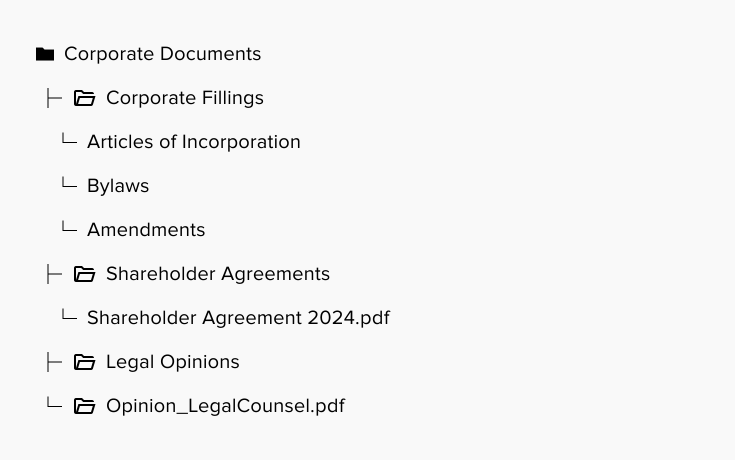
How a high-level folder breaks down
Here is the hierarchical example from the main folder to the subfolders:
Organizing, naming, and setting access permissions for subfolders
A well-structured M&A data room ensures documents are easy to find, reduces errors, and keeps sensitive information secure. Following the practices below helps streamline due diligence and keeps the deal on track.
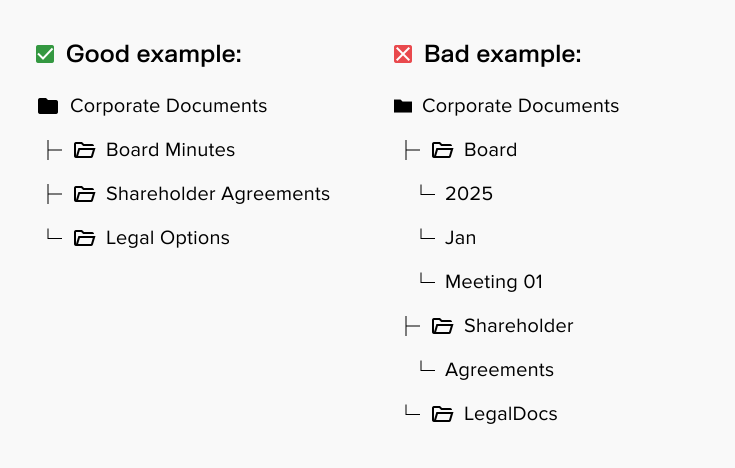
1. Subfolder organization
- Group related documents together for intuitive navigation.
- Maintain a simple hierarchical structure when possible.
- Avoid over-nesting subfolders.
- Use consistent folder structures across main categories.
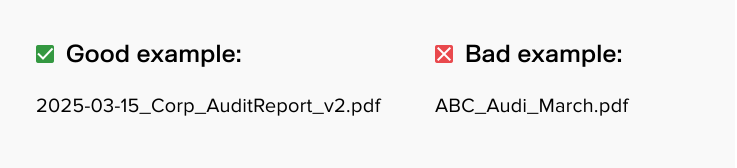
2. Naming conventions
- Include dates, company name, and document type.
- Use short and descriptive names.
- Incorporate universally understood abbreviations.
- Include version numbers for frequently updated documents.
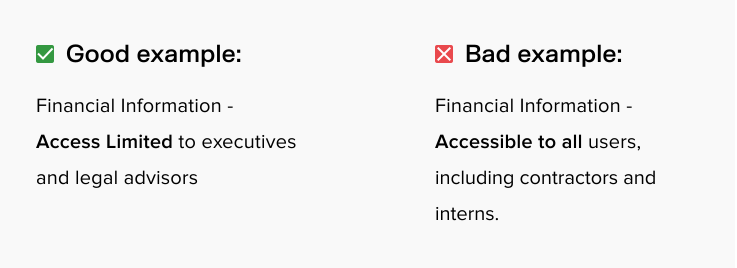
3. Access control
- Allow authorized users to access only relevant documents.
- Restrict sensitive folders (financials, HR, IP) to a limited group.
- Remove permissions for inactive participants.
- Track document activity through audit logs.
Must-have documents for an M&A data room
Below is a checklist of essential documents buyers expect during due diligence. These materials help validate financial performance, assess risks, and confirm the overall health of the business.
1. Corporate and legal
- Articles of incorporation/Certificate of formation
- Bylaws or operating agreement
- Shareholder/partnership agreements
- Board and shareholder meeting minutes
- Corporate structure chart
- Business licenses and permits
- Certificates of good standing
2. Financial Information
- Audited financial statements (3–5 years)
- Unaudited interim statements
- General ledger and trial balance
- Revenue breakdowns (product, customer, region)
- Cash flow statements
- Financial projections and assumptions
- Tax returns (federal, state, local)
- Debt schedules and loan agreements
3. Contracts and agreements
- Customer contracts (top clients highlighted)
- Supplier and vendor agreements
- Distribution and reseller agreements
- Lease agreements (real estate and equipment)
- Licensing agreements
- Joint venture or partnership contracts
- Insurance policies
4. Intellectual property
- Patent registrations and applications
- Trademark registrations
- Copyrights
- Domain names
- IP assignments and licensing documentation
- Confidentiality and invention-assignment agreements
5. Human resources
- Employee roster with roles and compensation
- Employment agreements
- Benefits plans
- Independent contractor agreements
- Organizational chart
- HR policies and handbooks
- Records of disputes or claims
6. Operations and technology
- Description of core operational processes
- IT systems architecture
- Software inventories and licenses
- Data protection policies
- Product roadmap and R&D documentation
- Supply chain documentation and vendor lists
7. Litigation and regulatory
- Pending or past litigation summaries
- Regulatory filings and correspondence
- Compliance reports
- Government inspections or audits
- Environmental assessments (if applicable)
8. Environmental, health, and safety
- Environmental permits
- Safety certifications
- Incident reports
- Waste management documentation
- EHS policies and audits
Before you start: Important notes about this document checklist
The following clarifications help ensure you assemble a complete, accurate, and secure package for buyers.
Key points to keep in mind:
- Document requirements differ by deal type, jurisdiction, and industry. Some complex financial transactions, especially regulated or cross-border deals, may require additional materials.
- The checklist is most relevant for share deals. In asset deals, certain corporate governance documents may not apply.
- Environmental, health, and safety materials are industry-dependent. They are only required for businesses with environmental exposure or regulatory obligations.
- Files should be provided in a buyer-ready format. Teams should use searchable PDFs, merge related documents, avoid duplicates, and follow naming conventions.
These considerations help you prepare a complete and secure online space, which is easy for buyers to review.
Step-by-step guide for setting up an M&A data room
Follow the steps below to set up your platform properly.
1. Define the data room scope and objectives
Before uploading files, determine what to include in the data room and who will access it.
- Identify the type of transaction (full sale, minority investment, merger, etc.).
- Decide what information will be shared at each stage (teaser, early-stage diligence, confirmatory diligence).
- Establish confidentiality rules for internal contributors.
2. Assign team roles and responsibilities
Define who is responsible for each part of the M&A virtual data room before uploading documents. Start by mapping ownership of key categories (finance, legal, operations) and decide who can upload, review, and approve final versions. Keep editing permissions limited to essential team members to maintain accuracy and control.
3. Set up the folder structure
Create a logical, buyer-friendly layout based on your company and deal specifics.
- Use a standard high-level structure.
- Build subfolders that mirror your internal documentation workflows.
- Keep the structure easy to navigate.
4. Configure permissions and access controls
Control access based on user roles and the sensitivity of each folder in your data room for M&A.
- Grant role-based or group-based access.
- Restrict sensitive areas (HR, litigation, financials).
- Enable fence view or limited viewing modes when needed.
- Regularly review access and remove inactive users.
5. Upload and organize documents
Populate the data room efficiently and accurately.
- Use bulk uploads and cloud integrations to save time.
- Apply labels/tags and consistent naming conventions.
- Use a due diligence checklist for completeness.
- Maintain version control to avoid outdated files.
6. Review and publish content
Always verify documents before making them visible to buyers.
- Check for missing pages, outdated versions, and inconsistent naming.
- Use redaction tools for personal or confidential information.
- Publish only after legal and financial advisors’ approval.
7. Set up Q&A workflows
Enable structured communication between the buyers and sellers.
- Activate the Q&A module with clear categories.
- Assign internal experts to answer specific question types.
- Keep all discussions linked to relevant documents.
8. Monitor activity and maintain the data room
A well-managed data room requires ongoing oversight.
- Track user engagement and document activity.
- Respond to Q&A promptly.
- Update documents as new information becomes available.
- Use audit logs to monitor compliance and access history.
9. Prepare for closing
Finalize the M&A virtual data room as the transaction nears completion.
- Provide final agreements, disclosures, and closing documents.
- Ensure all required electronic signatures are collected.
- Archive the data room for regulatory and post-deal needs.
Proper setup lays the foundation for a smooth, efficient due diligence process and helps the transaction stay on track.
Typical pitfalls in M&A data room management
Even the best virtual data rooms only work if used correctly. Address common challenges with proper setup and management.
- Disorganized folders → Keep hierarchy shallow, use consistent structures, and label files clearly.
- Incomplete or outdated documents → Use a due diligence checklist and maintain version control.
- Unclear access permissions → Assign role-based access and regularly review user permissions.
- Q&A management confusion → Centralize all questions and link them to relevant documents.
- Low visibility on activity → Track engagement with analytics and audit logs.
A properly configured M&A data room is secure and efficient. Any “pitfalls” arise from how teams set up and manage the platform.
The rise of AI in M&A data rooms
AI-powered virtual data rooms simplify repetitive tasks, accelerate due diligence, and improve insights through relevant tools.
| Feature | How it works | Key benefit |
|---|---|---|
| AI-powered redaction | Automatically detects personally identifiable information (PII) like names, SSNs, and passport numbers, and removes or masks it | Reduces manual review, ensures compliance, and speeds up due diligence |
| In-product translation | Translates documents into multiple languages with contextual accuracy | Accelerates cross-border review and enables teams to work in their preferred language |
| Intelligent search | Uses AI to understand document meaning and context, not just keywords, to locate relevant content | Recognizes insights faster to improve decision-making in large document sets |
| Automated document summarization | Generates concise summaries of long contracts, reports, and financial documents | Helps reviewers quickly understand key points without reading every line |
| AI-powered Q&A assistance | Suggests answers and links to relevant documents based on buyer questions | Speeds up the Q&A process, reduces back-and-forth emails, and ensures clarity |
| Predictive insights and analytics | Analyzes user engagement and activity to predict which documents need attention | Helps sellers prioritize document updates and follow-ups |
| Workflow automation | Suggests task assignments, document routing, and reminders based on deal progress | Keeps teams aligned and reduces administrative overhead |
Summary
Virtual data rooms offer a secure and organized way to manage confidential documents throughout every stage of an M&A transaction. When selecting a solution, compare virtual data rooms carefully to choose one that offers robust security, streamlined workflows, AI-powered insights, and seamless collaboration for faster, more efficient due diligence.